
If you are part of the Anganwadi system today, data is no longer just paperwork – it is proof of the work you do every single day. Poshan Abhiyaan 2025: How to Use the Poshan Maah Tracker and Complete Data Entry is the backbone of how your efforts are seen, measured, and supported at block, district, state, and national level. When the Poshan Maah Tracker is used properly, every home visit, meeting, rally, and counselling session becomes visible on a real‑time dashboard instead of disappearing into a physical register. That is why understanding Poshan Abhiyaan 2025: How to Use the Poshan Maah Tracker and Complete Data Entry is no longer optional it directly affects your project’s performance, your block’s ranking, and even the kind of support your area receives in future planning. The cleaner, timely, and more accurate your entries, the stronger your work looks in reports and the easier it becomes for officials to back your demands with solid data.

This guide is designed to walk you through Poshan Abhiyaan 2025: How to Use the Poshan Maah Tracker and Complete Data Entry in a practical, ground‑level way. Instead of confusing technical language, you will see simple, clear steps that fit into your daily routine as an Anganwadi Worker, Supervisor, CDPO, or block/district official. By the end, you will know how to select the right activity, record realistic participant numbers, upload photos as proof, and double‑check reports so that nothing is missed or duplicated. When you make the Poshan Maah Tracker part of your everyday workflow, separate paper registers reduce, and your time and energy stay focused where they matter most – on families and children.
Poshan Abhiyaan 2025
Why the Poshan Maah Tracker and Data Entry Matter
During Poshan Maah, dozens of things happen in your area rallies, village meetings, school sessions, kitchen garden events, anaemia camps, home visits, and more. If these are not entered into the Poshan Maah Tracker, they simply do not exist in the official record. On the other hand, once they are entered correctly, they become part of the bigger national picture, showing how active your block really is.
This data is used to see which districts are truly running a nutrition‑focused Jan Andolan and which areas may need extra support, training, or resources. Clean, honest data entry also protects you if anyone questions whether activities actually happened, the photos and numbers in the Poshan Maah Tracker become your strongest proof.
How to Access the Poshan Maah Tracker Under Poshan Abhiyaan 2025
Before you start entering data, you must be clear about one thing: whose login is being used for the Poshan Maah Tracker in your project. In some places, Anganwadi Workers have their own credentials on the Poshan Tracker app; in others, entries are done by the Supervisor or by a dedicated computer operator at the block office.
Logins are usually created by the department and shared officially. The first time you log in, it is wise to change the password or set a secure MPIN so that no one else can enter data in your name without your knowledge. If multiple people share the same login, decide at the start of the day who will actually enter activities and who will only download reports, so that the same event is not entered twice by mistake.
Steps to Select an Activity in the Poshan Maah Tracker
Once you log in to the portal or app, you usually land on a section such as “Jan Andolan / Poshan Maah Activity Entry” or an “Activity Detail / Participation Form.” This is where every single Poshan Maah activity will be recorded.
You will typically need to fill in a few key fields:
- Activity – Choose what actually happened: home visit, village meeting, rally, school awareness session, Poshan Vatika activity, etc.
- Theme – Select the theme under which the activity was held, such as infant and young child feeding, anaemia, adolescent nutrition, or kitchen garden promotion.
- Level – Mark whether the activity was held at village/AWC level, block level, or district level.
- Organiser – Mention who organised it: AWW, Supervisor, CDPO, health department, education department, or another line department.
If the wrong activity or theme is selected, your hard work may show under the wrong category or may not reflect properly in theme‑wise reports. Taking 20 extra seconds to double‑check these fields saves a lot of confusion later.
How to Enter Participants and Beneficiary Data
The strength of any event is seen in two ways how many people attended and who they were. That is why the Poshan Maah Tracker does not stop at “total participants”; it also asks for a basic break‑up.
You may see fields like adult male, adult female, child male, child female, or separate boxes for pregnant women, lactating mothers, children 0–3, 3–6, and adolescents. The golden rule is simple: the sum of the break‑up must match the total number at the top. If it does not, the system will either show an error or reject the form.
Try to keep the numbers realistic. For example, if only 60 children are actually registered in your AWC, showing 250 children in a small courtyard meeting will raise questions later. It is better to record a real, smaller number than to chase an impressive but false total. When you are unsure, quickly check with your team and agree on a fair estimate rather than guessing alone.
How to Upload Photos, Submit, and Check Your Entry
Poshan Abhiyaan 2025 encourages evidence‑based monitoring, which means that along with numbers, photos play an important role in showing that an event actually took place. The Poshan Maah Tracker therefore usually has an option to upload one or more photos for each activity.
Choose images where the activity is clearly visible for example, a group of mothers in a counselling session, children holding banners during a rally, or a village meeting with the facilitator in frame. Avoid blurry photos or images where nothing is clear. After filling all fields and uploading the photo, press submit once and wait patiently; hitting back or refresh repeatedly can create errors or duplicate entries.
Once submitted, always go to the “View Entries” or “View Report” section and confirm that:
- The activity is showing under the correct date.
- The village/AWC name is correct.
- The participant numbers look right.
- The photo thumbnail appears where expected.
If anything looks wrong, contact your Supervisor or block‑level operator immediately. It is always easier to correct data the same day than to fix a long list of errors at the end of the month.
Common Mistakes While Using the Poshan Maah Tracker and How to Avoid Them
Two common mistakes cause the most trouble in Poshan Maah reporting. First, the same event is entered two or three times because different people thought they needed to “send their own report.” Second, routine activities that happen all year round are sometimes shown as special Poshan Maah events even when they are not part of the specific monthly plan.
You can avoid this by following a few simple habits:
- At the end of each day, write a small offline list of all events conducted – time, place, and type – and only then do the online entry.
- Once a week, the Supervisor can download a block‑level summary and compare it with what is actually happening on the ground.
- If the internet is slow, do not press submit again and again; wait for the confirmation message instead of refreshing the page.
These small steps keep your Poshan Maah Tracker data clean and help build trust in the numbers coming from your area.
New Features in Poshan Tracker and Trends in 2025
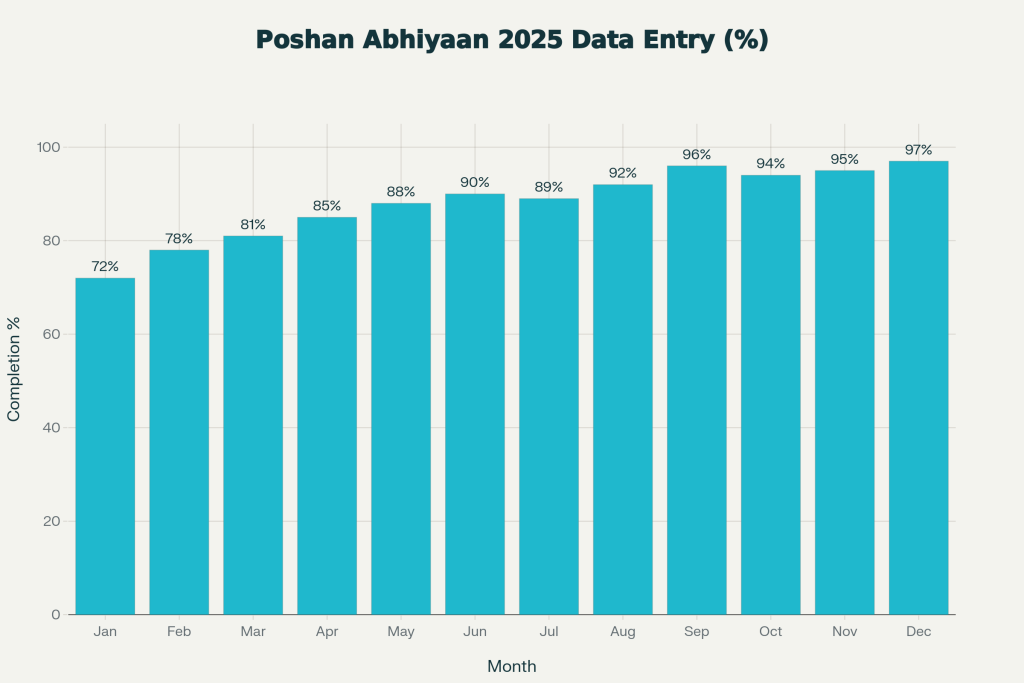
By 2025, digital nutrition tracking under Poshan Abhiyaan has moved far beyond simple counting. Many dashboards now show trends over time – where underweight cases are reducing, which blocks are doing more home visits, and where adolescent girls are being consistently reached with nutrition education. This kind of real‑time, visual data makes it much easier for decision‑makers to focus attention where it is most needed.
In this ecosystem, the Poshan Maah Tracker is not “just one more form.” It is the bridge between your field‑level action and high‑level planning. When your data is timely, honest, and complete, your district stands on stronger ground while asking for extra resources, capacity‑building, or innovations. In simple words: good data today can mean better support for you and your beneficiaries tomorrow.
FAQs on Poshan Abhiyaan 2025
1. What Is the Difference Between Poshan Maah Tracker and Poshan Tracker?
Poshan Tracker is the full platform used all year round to register beneficiaries, track growth, and record routine ICDS services. The Poshan Maah Tracker is a specialised part of this system that captures only Poshan Maah and Jan Andolan activities held during the focused campaign period.
2. Is It Necessary to Enter Data in the Poshan Maah Tracker Every Day?
Ideally, yes. Data should be entered on the same day or by the next day so that the dashboard reflects real‑time progress. Waiting till the end of the month increases the risk of forgotten events, wrong dates, and mismatched numbers.
3. What Happens If The Total Participants And The Break‑up Do Not Match?
If the total at the top and the detailed break‑up below do not add up, the system may show an error and prevent you from submitting the form. This is built‑in to protect the quality of Poshan Abhiyaan 2025 data and to avoid basic calculation mistakes.
4. Is An Entry Valid Without Uploading A Photo?
In many states, a photo is now treated as essential proof of activity, especially for Poshan Maah and large community events. Even where it is not strictly mandatory, uploading at least one clear photo is strongly recommended so that your work is visible and verifiable later.