

If there’s one quick digital safety habit worth adding in 2025, it’s checking how many SIMs are running on your ID. The Sanchar Saathi Portal 2025 helps you confirm every mobile connection issued in your name, so you can catch unknown numbers early and stop misuse before it turns into a bigger problem. Most people assume “one Aadhaar = one SIM,” but that’s not how fraud works. With stolen KYC details, someone can activate a new number and use it for spam, scams, or account takeovers. That’s exactly why Sanchar Saathi Portal 2025 exists: to give you a clean, official view of your connections and a way to report or block issues without running from store to store.
Sanchar Saathi is a citizen service platform from the Department of Telecommunications (DoT) designed to improve telecom safety through tools like SIM-connection checking, lost phone blocking, and scam reporting. It combines multiple public-facing modules (like Chakshu and CEIR) so you can handle common telecom risks from one place using OTP verification. In 2025, the wider focus remains on preventing telecom fraud, blocking compromised devices, and making it easier for users to self-verify connections linked to their identity.
Sanchar Saathi Portal 2025
Chakshu – Report Suspected Fraud Communication
Chakshu is the section people usually discover after getting an obvious scam message “KYC expired,” “parcel stuck,” “bank account blocked,” and so on. Instead of only blocking the number on your phone (which doesn’t stop the scammer from targeting others), Chakshu lets you submit a structured report to the official system.
To report smoothly, keep it simple:
- Save the suspicious number/message details (date, time, sender ID/number).
- Take a screenshot if it’s a message or WhatsApp chat.
- Submit the details on Chakshu and verify with OTP.
A useful mindset: treat Chakshu as “signal intelligence.” You’re not arguing with scammers you’re feeding the system enough detail to help patterns get detected and acted on. And if money has already been lost, it’s still better to report the fraud to the cybercrime channel immediately rather than waiting for telecom action.
Block Your Lost / Stolen Mobile Handset on Sanchar Saathi Portal 2025
Losing a phone is stressful for one reason more than the device cost: the SIM inside it can become a tool for OTP theft, UPI abuse, and social engineering. The portal’s lost/stolen handset blocking feature (CEIR) is built for that moment when speed matters.
Here’s the practical way to do it without getting overwhelmed:
- Find your IMEI (it may be on the phone box, bill, or your Google/Apple device details; *#06# works only if the phone is in your hand).
- File the request on the portal with the required details and upload documents if asked.
- After blocking, follow up with your operator to reissue your SIM on a replacement device.
If you recover the phone later, there’s also a process to request unblocking, so the handset works normally again. This one feature alone is why many people keep Sanchar Saathi bookmarked it turns a chaotic situation into a checklist you can finish in minutes.
Know Mobile Connections In Your Name
This is the feature most people mean when they search “how many SIM cards are active in my name.” It allows you to view mobile connections issued under your identity and flag the ones you don’t recognize. The TAFCOP pathway is also used for this “connections in my name” check.
A smart way to use it (so you don’t miss anything):
- Check the list carefully, not just the count. Sometimes the “extra” number is an old SIM you forgot (secondary phone, data SIM, or a number ported years ago).
- If a connection is truly unknown, act quickly. Even one unauthorized SIM can be enough for fraud, because that number may be used for OTP interception attempts, fake profiles, or scam calls.
- If a family member’s SIM is on your KYC (common in many households), decide whether to regularize it or close it keeping “extra” connections open without clarity is the risk.
Make this a routine: once every few months, do a quick Sanchar Saathi Portal 2025 check, especially after you share documents for any verification (banking, hotel stay, travel SIM, repair shops, etc.). This tiny habit reduces long-term exposure.
Know Genuineness Of Your Mobile Handset
Buying a phone especially a second-hand device comes with one silent risk: invalid or duplicated IMEI. The portal’s handset genuineness check is meant to help you avoid devices that may later face network restrictions or create legal headaches.
Use this feature when:
- You’re buying a used phone from a local shop or online marketplace.
- You’re seeing weird network behavior that doesn’t match your SIM or coverage area.
- You suspect the device may have been repaired with questionable parts.
Basic best practices:
- Match the IMEI displayed on the phone with the IMEI on the box/bill (if available).
- Avoid sellers who refuse to share IMEI before purchase there’s no legitimate reason to hide it when you’re doing a safety check.
- Prefer a bill with serial/IMEI details for expensive devices.
Report Incoming International Call With Indian Number
Spoofed calls are one of the most common “modern fraud” tricks: you see a normal-looking Indian number, but the call behaves like an international spam burst. The portal allows users to report these cases so the pattern can be flagged.
If you want to report effectively, note:
- The displayed number.
- Approximate time and date.
- What the caller claimed (bank, courier, police, “TRAI,” “KYC team,” etc.).
The goal isn’t to prove anything yourself it’s to provide the system a consistent report, so repeated misuse becomes traceable. This is especially useful when scammers rotate numbers fast and target people in bursts.
Keep Yourself Aware
Sanchar Saathi is not just a “check SIMs” website. It’s also an awareness hub that nudges users toward safer telecom behavior—because most scams rely on human panic, not technical hacking.
A few habits that pair perfectly with Sanchar Saathi Portal 2025:
- Don’t share OTPs, even with someone claiming to be your operator or bank.
- Don’t click unknown links sent via SMS or WhatsApp verify using official apps/websites.
- Keep your SIM ownership clean: close unused numbers; avoid “extra SIMs” in your name “just in case.”
- If your phone is lost, block fast; if a SIM is unknown, flag it fast.
Think of the portal as your “telecom control panel.” When something feels off, you have a place to check first, rather than guessing.
YSR Cheyutha Scheme 2025: Women to Receive ₹75,000 – But Only If They Meet These Rules
Recent Updates In 2025
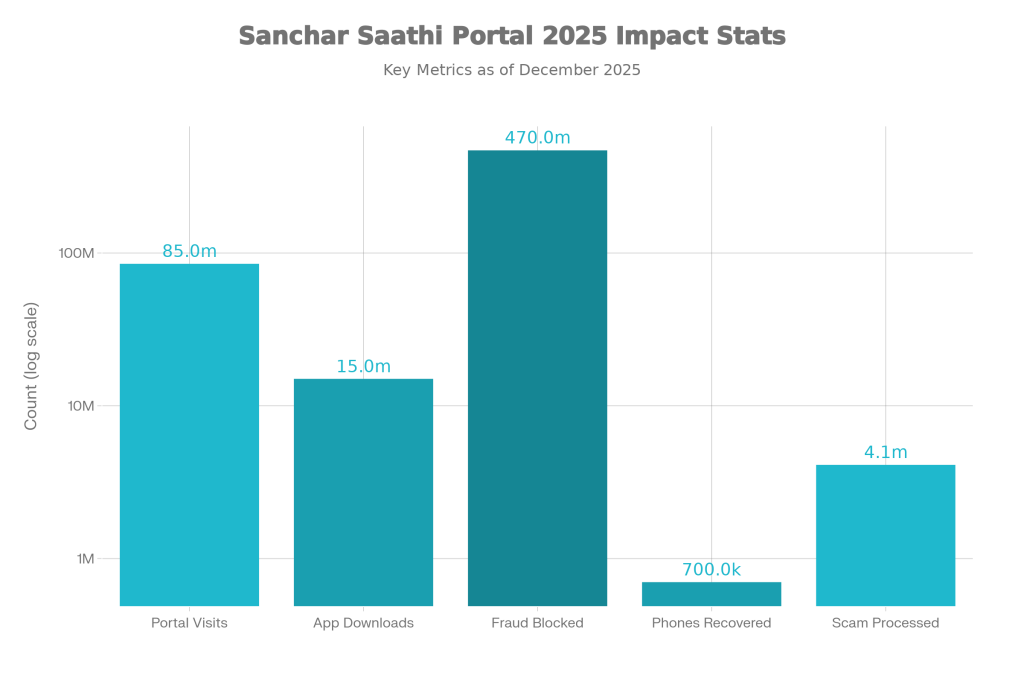
In late 2025, public discussion increased around the Sanchar Saathi app’s rollout and related privacy concerns, and reports noted that the government withdrew the earlier mandatory pre-installation direction. At the same time, adoption continued to rise, with reports highlighting the app crossing major download milestones during 2025. These updates matter for users because they show the platform is evolving while staying focused on voluntary, citizen-driven telecom safety.
FAQs on Sanchar Saathi Portal 2025
What is Sanchar Saathi Portal 2025 used for?
How can I check how many SIM cards are active in my name?
What should I do if I find an unknown number linked to my ID?
Treat it as urgent: flag it through the portal process and also contact your telecom operator to confirm disconnection steps, because unauthorized SIMs can be used for fraud quickly.